Find any email in seconds
AI-powered search for Outlook — faster and smarter than native search.
Inbox Search is an Outlook search add-in that builds a local fingerprint index of your mailbox using on-device AI, so you get instant, accurate results without anything leaving your computer.
After you install, open Inbox Search from any email and allow it to read your mail when Microsoft asks. Some workplaces need IT to approve this once: guide for IT admins. Step-by-step install guide
Inbox Search is an Outlook add-in that replaces Outlook's slow, keyword-only search with fast, AI-powered hybrid search. It builds a local fingerprint index of every email in your primary mailbox using semantic embeddings and TF-IDF keyword analysis, so you can find messages by meaning — not just exact words. Search "budget discussion from last quarter" and get results even if none of your emails contain that exact phrase — including emails that Outlook search quietly drops.
Your emails are indexed and searched on your device. No email content is ever sent to a server. The index stays on your device and catches up with new mail each time you open Inbox Search. Inbox Search works with Outlook on the web, new and classic Outlook for Windows, and Outlook for Mac.
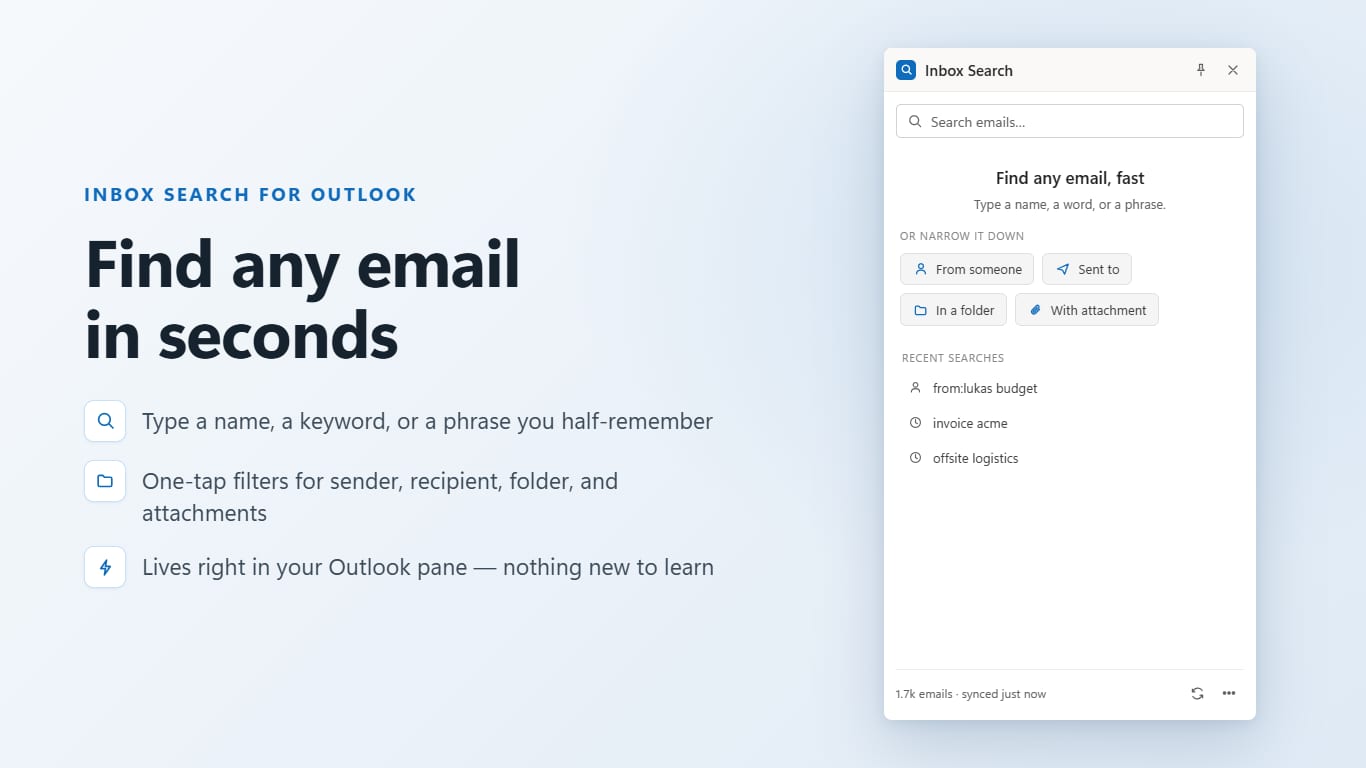
Outlook search that actually works
Outlook's built-in search is slow and misses what you're looking for. Inbox Search fixes that.
Semantic + keyword search
Combines AI embeddings with TF-IDF keyword matching. Find emails by meaning, not just exact words.
Instant results
Results appear as you type, ranked by relevance.
Private by design
The AI model runs entirely on your device. No email content is ever sent to external servers.
Local index
Indexes your mailbox once and keeps the index on your device, refreshed each time you open Inbox Search.
Nothing to configure
Install it, sign in, and search. No rules or training needed.
Windows, Mac and web
Outlook on the web, new and classic Outlook for Windows, and Outlook for Mac.
How it works
Install the add-in
Add Inbox Search to Outlook, open it from any email and sign in with your Microsoft account. It then indexes your mailbox.
Index builds locally
A lightweight AI model creates a fingerprint of each email — all processing happens on your device.
Search instantly
Type what you're looking for in plain language. Results are ranked by meaning, not just keywords.
Your emails stay on your device
Inbox Search processes everything locally using a small AI model that runs in your browser. Microsoft Graph is used only to read your emails for indexing — your email is never stored on our servers.
Read the full privacy policy →- No email content sent to external servers
- No tracking cookies
- No account creation required
- Search index stored locally on your device only
- Minimum required Microsoft Graph permissions
Frequently asked questions
From the blog
June 2026
Outlook Search Indexing Slow or Stuck? How to Rebuild It (2026)
Outlook search slow or returning partial results? Learn how to check indexing status, rebuild the search index, and fix a stuck index.
June 2026
Outlook for Mac Search Not Working? How to Rebuild the Index (2026)
Outlook search not working on Mac? Learn how to rebuild the Spotlight index, run the OutlookSearchRepair utility, and fix no-results errors.
June 2026
Every Outlook Search Operator & Syntax Command — 2026 Cheat Sheet
Complete reference of every Outlook search operator — from:, subject:, hasattachment:, date ranges, Boolean logic, and more.
Stop losing emails in your inbox
Inbox Search is an Outlook add-in. Fast, private, semantic search — available now.
Install from Microsoft MarketplaceAfter you install, open Inbox Search from any email and allow it to read your mail when Microsoft asks. Some workplaces need IT to approve this once: guide for IT admins. Step-by-step install guide